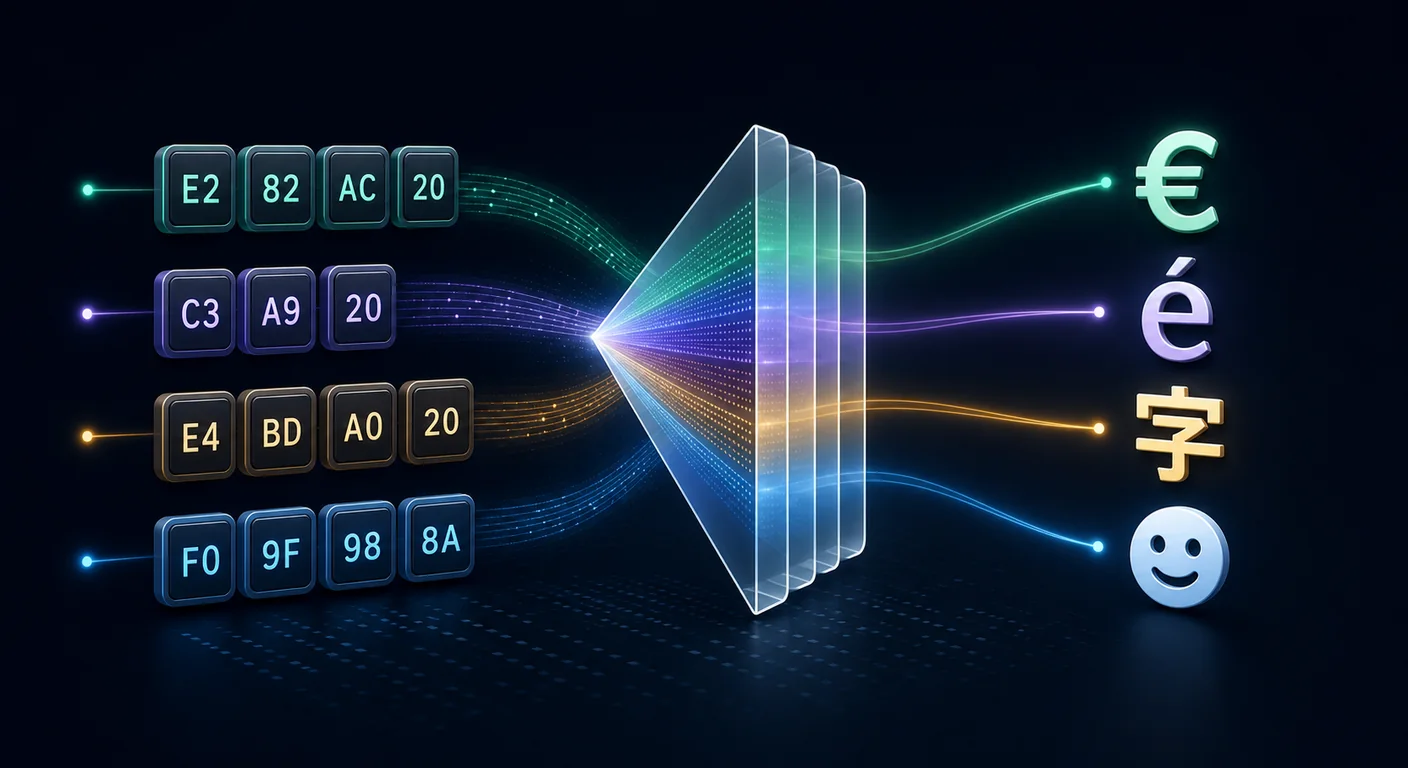
A hex string can reconstruct the intended bytes and still display as café or �. Those outputs indicate that the decoder used the wrong character encoding or encountered an invalid byte sequence.
This guide decodes hex as UTF-8 in Python, JavaScript, Go, and shell. The hex to ASCII programming guide covers strict 7-bit data; UTF-8 adds multi-byte sequences for other Unicode code points.
Use the hex decoder to compare ASCII, Latin-1, and UTF-8 output in the browser.
ASCII and UTF-8 Diverge Above 127
ASCII assigns codes 0–127: the Latin alphabet, digits, punctuation, and control codes. Every ASCII character is exactly one byte, and that byte's top bit is always 0 (00–7F). For English text, hex-to-ASCII and hex-to-UTF-8 give identical results, because UTF-8 was deliberately designed so that all 128 ASCII characters encode to the same single bytes.
The divergence starts at byte value 128 (80). The character é, €, 中, or 😀 cannot fit in one byte. UTF-8 represents these using two, three, or four bytes, and those bytes individually are not valid standalone characters. Decode them one at a time as Latin-1 or ASCII and you get the classic mangled output known as mojibake.
How UTF-8 Encodes a Character
UTF-8 is a variable-width encoding. The number of bytes is signaled by the high bits of the first byte:
| Code point range | Bytes | First byte pattern | Continuation bytes |
|---|---|---|---|
| U+0000 – U+007F | 1 | 0xxxxxxx |
none |
| U+0080 – U+07FF | 2 | 110xxxxx |
10xxxxxx |
| U+0800 – U+FFFF | 3 | 1110xxxx |
10xxxxxx × 2 |
| U+10000 – U+10FFFF | 4 | 11110xxx |
10xxxxxx × 3 |
Every continuation byte starts with the bits 10, which is how a decoder knows it's in the middle of a sequence and not at a character boundary. Two concrete examples:
éis U+00E9, which encodes as the two bytesc3 a9.😀is U+1F600, which encodes as the four bytesf0 9f 98 80.
So the hex 63 61 66 c3 a9 is five bytes but four characters: c, a, f, then c3 a9 combine into é, giving café. Read those last two bytes separately and you instead get à (c3) and © (a9) — that's where café comes from.
Decoding Hex to UTF-8 in Code
Python
Convert the hex to raw bytes, then decode those bytes as UTF-8 in one step:
hex_string = "636166c3a9"
text = bytes.fromhex(hex_string).decode("utf-8")
print(text)  # café
The two operations are distinct and both matter: bytes.fromhex() turns the hex digits into actual bytes, and .decode("utf-8") interprets those bytes as a UTF-8 string. Swap in .decode("ascii") and the same data throws a UnicodeDecodeError, because c3 is above 127.
JavaScript
Build a byte array from the hex, then let TextDecoder apply UTF-8:
function hexToUtf8(hex) {
  if (!/^[0-9a-fA-F\s:]*$/.test(hex)) {
    throw new TypeError("Input contains non-hex characters");
  }

  const compact = hex.replace(/[\s:]/g, "");
  if (compact.length % 2 !== 0) {
    throw new TypeError("Hex input must contain complete byte pairs");
  }

  const bytes = new Uint8Array(compact.length / 2);
  for (let i = 0; i < bytes.length; i++) {
    bytes[i] = Number.parseInt(compact.slice(i * 2, i * 2 + 2), 16);
  }
  return new TextDecoder("utf-8", { fatal: true }).decode(bytes);
}

console.log(hexToUtf8("f09f9880")); // 😀
Avoid the old String.fromCharCode(parseInt(pair, 16)) loop for anything non-English: it treats each byte as a separate code unit and produces mojibake for multi-byte characters. TextDecoder is the correct, Unicode-aware tool.
Go
A Go string can contain arbitrary bytes; converting []byte to string does not validate UTF-8. Decode the hex, check utf8.Valid, and only then interpret the bytes as text:
package main

import (
    "encoding/hex"
    "fmt"
    "unicode/utf8"
)

func main() {
    b, err := hex.DecodeString("e4b8ad") // 中
    if err != nil {
        panic(err)
    }
    if !utf8.Valid(b) {
        panic("decoded bytes are not valid UTF-8")
    }
    fmt.Println(string(b)) // prints: 中
}
Command Line
xxd -r -p reverses hex back to raw bytes; pipe it through a UTF-8-aware terminal and the characters render directly:
echo "636166c3a9" | xxd -r -p
# café

echo "f09f9880" | xxd -r -p
# 😀
If your terminal shows boxes instead of the emoji, that's a font/locale display issue, not a decoding error — the bytes were reconstructed correctly.
Why You're Seeing Garbage — and How to Fix It
Symptom: é, ’, ü (mojibake)
Cause: UTF-8 bytes were decoded as a single-byte encoding (Latin-1 / Windows-1252). Each multi-byte sequence got split into separate "characters."
Fix: Decode as UTF-8, not ASCII or Latin-1.
# wrong: each byte read alone
bytes.fromhex("c3a9").decode("latin-1")   # 'é'
# right: bytes read together as one UTF-8 sequence
bytes.fromhex("c3a9").decode("utf-8")     # 'é'
Symptom: � replacement characters
Cause: The byte sequence is not valid UTF-8 — perhaps it's genuinely a different encoding, the data is truncated mid-character, or it's binary that was never text. The � (U+FFFD) is the decoder's way of saying "this isn't valid here."
Fix: First confirm the data really is UTF-8. If a sequence is cut off (you sliced a byte buffer in the middle of a multi-byte character), realign to a character boundary. If it's a legacy encoding, decode with the correct one:
data = bytes.fromhex("e9")  # lone 0xE9 — valid Latin-1 'é', invalid UTF-8
data.decode("latin-1")              # 'é'
data.decode("utf-8", errors="replace")  # '�'
Symptom: UnicodeDecodeError / an exception
Cause: You asked for strict ASCII decoding (or strict UTF-8) on bytes that don't qualify.
Fix: Decode as UTF-8, and choose an error policy if some bytes may be malformed: errors="replace" substitutes �, errors="ignore" drops the bad bytes, and the default raises so you notice corruption early. Use replace for display, strict (the default) for validation.
Symptom: extra invisible character at the very start
Cause: A UTF-8 byte-order mark (BOM), ef bb bf, prepended to the data. It's harmless but shows up as a zero-width character or a stray .
Fix: Decode with utf-8-sig in Python to strip a leading BOM automatically, or slice off the first three bytes if present.
A Quick Decision Guide
When a hex string won't decode cleanly, run through this in order:
- Is it ASCII-only? If every byte is
00–7F, ASCII and UTF-8 agree — the problem is elsewhere (whitespace, delimiters). - Are there bytes ≥
80? The data is not ASCII. UTF-8 is a sensible first test for modern text, but a legacy encoding or binary format remains possible. - Does strict UTF-8 decoding fail? The data may use another encoding, be truncated, or not be text at all. Do not treat successful Latin-1 decoding as proof: Latin-1 assigns a character to every byte value, so it cannot validate the original encoding.
- Mojibake like
é? You decoded UTF-8 as a single-byte encoding. Re-decode as UTF-8.
The complete ASCII table lists bytes 00-7F. The ASCII, UTF-8, and Unicode guide covers the broader encoding model.
FAQ
How do I decode hex to UTF-8 in Python?
Use two steps: bytes.fromhex(hex_string).decode("utf-8"). The first call converts hex digits into raw bytes; the second interprets those bytes as a UTF-8 string. For example, bytes.fromhex("e282ac").decode("utf-8") returns €. Add errors="replace" if some bytes might be invalid and you'd rather see � than raise an exception.
Why does my hex decode to é instead of é?
Because the UTF-8 bytes c3 a9 were decoded one at a time as Latin-1 or Windows-1252, splitting a single two-byte character into à and ©. This is called mojibake. Decode the bytes as UTF-8 in a single operation and the two bytes combine correctly into é.
What does the � character mean when decoding?
It's U+FFFD, the Unicode replacement character. A UTF-8 decoder emits it when it hits a byte sequence that isn't valid UTF-8 — commonly because the data is actually a different encoding, was truncated in the middle of a multi-byte character, or isn't text at all. It signals where decoding failed, not a character that was in the original data.
Is hex to ASCII different from hex to UTF-8?
For bytes 00–7F they are identical, since UTF-8 was designed to be ASCII-compatible. They differ once non-ASCII data appears: UTF-8 uses two-to-four-byte sequences for non-ASCII scalar values. Accented letters, symbols, and emoji require an encoding beyond ASCII; UTF-8 is the usual choice for modern interchange, but the source format must determine the decoder.
How many bytes is an emoji in hex?
Many emoji scalar values are four bytes in UTF-8. For instance, 😀
(U+1F600) is f0 9f 98 80, while some emoji-capable symbols are three
bytes. Flags use pairs of regional-indicator scalars, skin tones add an
emoji-modifier scalar, and zero-width joiners connect certain other emoji
compositions. These multi-scalar sequences can therefore use eight bytes or
substantially more.
Can I tell which encoding a hex string uses just by looking?
Not with certainty. All bytes ≤ 7F are compatible with ASCII and UTF-8 but could belong to many other formats. Valid UTF-8 lead/continuation patterns make UTF-8 plausible, and a leading ef bb bf is a strong UTF-8 signature, but short byte strings can be valid under several encodings. Prefer declared metadata, protocol specifications, or knowledge of the source over guessing from bytes alone.
Summary
Decode hex into bytes first, then apply the encoding named by the source format. Use strict mode to validate data and a replacement policy only when lossy display is acceptable. The hex decoder lets you switch among ASCII, Latin-1, and UTF-8 interpretations and reports whether the bytes form valid UTF-8.